

I remember the exact moment I realized my office was attacking me. I was driving home, trying to merge onto the highway, and I simply couldn’t turn my head far enough to the left to see the oncoming traffic. My neck hit a wall. It wasn’t a sharp injury; it was a deep, structural ‘no.’ I had spent the last six months with a new 32-inch curved monitor sitting to the left of my main screen, and without realizing it, I spent forty hours a week with my chin pointed ten degrees away from my sternum. That tiny angle, held for hours on end, had effectively shortened the muscles on one side of my neck while overstretching the others. I was a victim of my own productivity. If you feel like your neck is constantly ‘stuck’ or you’ve noticed that the reason your neck clicks when you look over your shoulder is getting louder every month, you are likely stuck in the same ergonomic trap I was. We aren’t built to be statues, especially not twisted ones. Today, I am going to show you exactly how I redesigned my desk to save my spine and how you can do the same without losing your dual-screen workflow.
Stop the Screwdriver Spin at Your Desk
My biggest mistake was the ‘asymmetric layout.’ I had one primary monitor directly in front of me and a secondary monitor off to the left. I thought I was being efficient, but I was forcing my neck into a sustained rotation. Research published in the Journal of Physical Therapy Science highlights that prolonged neck rotation significantly increases the activity of the upper trapezius and levator scapulae, leading to chronic muscle fatigue and that ‘burning’ sensation in your shoulders. It is no wonder why your head feels heavy after staring at a monitor; your muscles are literally pulling overtime to keep your head from falling off your shoulders. I used to think I just needed a better massage, but no amount of rubbing can fix a structural habit that happens for eight hours a day. You have to understand the link between mobility and posture to realize that if the foundation is crooked, the house will eventually tilt. Have you ever felt that weird, one-sided tightness that just won’t go away no matter how much you stretch?
Is it really the monitors or am I just getting old?
Skepticism is healthy, especially when someone tells you to move your favorite screen. You might think your neck issues are just a rite of passage for reaching a certain age. But here is the thing: age doesn’t cause a specific, localized stiffness on only one side of your neck. Your environment does. When I finally implemented the desk setup trick for people who hate standing desks, the relief was life-changing. We often mistake ‘normal aging’ for ‘accumulated postural stress.’ The good news is that unlike the passage of time, your desk setup is something you can actually control. We are going to dive into the specific angles that keep your chin aligned with your chest and why ‘perfect’ symmetry is your best friend for a pain-free workday.
Stop Turning Your Head to Work
To fix your neck, you have to stop treating your primary monitor like a side dish. When I was struggling with that 32-inch curved beast, I realized I was treating my body like a swivel chair that never returned to center. Think of your neck like the front alignment on a car; if you drive ten thousand miles with the wheels slightly turned to the left, the tires will bald unevenly. Your neck muscles do the exact same thing. The first step is to place your most-used monitor dead-center with your nose. If you use two monitors equally, they should meet in a ‘V’ shape directly in front of your face. I remember when I first made this shift; for the first three days, my neck actually felt more tired because the overstretched muscles on my right side were finally being asked to hold weight again. It was messy, and I almost went back to my old ways, but that discomfort is a sign of your muscles relearning their jobs. If you aren’t sure how much damage you’ve already done, you can learn how to test your own spinal rotation at home to see which side is lagging behind.
Put Your Monitor on a Pedestal
Most of us have monitors that sit far too low. When you look down, even slightly, you increase the effective weight of your head on your spine from 12 pounds to nearly 60 pounds. It is like holding a bowling ball out at arm’s length versus holding it against your chest. Your top third of the screen should be at eye level. This forces your chin to tuck slightly, which engages the deep neck flexors and prevents that ‘forward head’ slump. I once used a stack of old textbooks to lift my screen while waiting for a proper monitor arm, and the relief was instantaneous. No more squinting or leaning in. If you find yourself hunching forward despite the height change, you might need some quick mobility hacks to loosen up the chest muscles that are pulling your shoulders inward.
Does the 50/50 Split Actually Work?
Many people ask if they should have two monitors side-by-side or one main and one secondary. If you spend more than 80% of your time on one task, go with a primary-central setup. If you are constantly toggling between two spreadsheets, the 50/50 split is better, but you must rotate your entire chair, not just your neck. Use your hips to point your body at the active screen. This prevents the ‘screwdriver spin’ in your cervical spine. This kind of repetitive twisting is exactly why your shoulders burn after a long zoom call. When you rotate from the waist, you protect the delicate joints in your neck from sheer force. To keep things loose throughout the day, I highly recommend using this 10-second move to reset your shoulders at work every time you finish a task or hang up a call. Your spine will thank you for the micro-break.Most people think the goal of an adjustment is simply ‘cracking’ a joint back into its socket. In reality, that sound you hear is just gas bubbles popping, and the real magic happens in your brain’s motor cortex. When I first started my journey, I believed the ‘bone out of place’ theory, but science tells a different story. According to research in the Journal of Manipulative and Physiological Therapeutics, spinal manipulation actually alters the way your central nervous system processes sensory input. It’s less like a hammer and more like a software update. This is how chiropractic adjustments enhance posture and mobility—they improve the signal between your brain and your joints.
Is Your Tightness Actually Weakness in Disguise?
I see this all the time: someone feels a ‘knot’ in their upper traps and spends twenty minutes a day pulling their head to the side. Here is the ‘Oops’ factor you must avoid: stretching a muscle that is already overstretched and weak. When you sit with your head forward, your back muscles are pulled taut like a bowstring. They feel tight because they are under extreme tension, not because they are short. This is exactly why stretching your neck is making your headaches worse; you are effectively pulling on a muscle that’s already begging for a break. 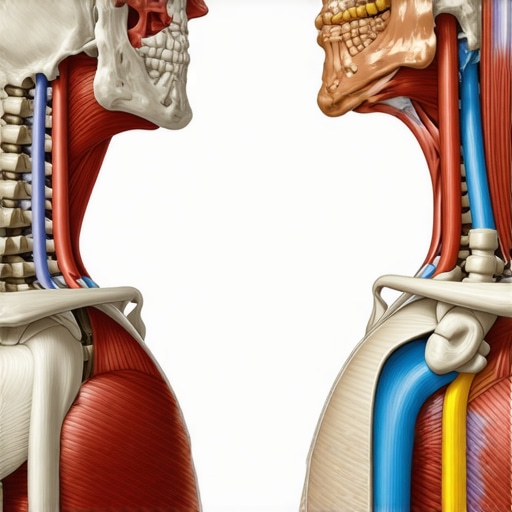 Instead of more stretching, you likely need more activation. Learning how to revolutionize your posture with targeted mobility exercises that focus on strength, rather than just flexibility, is the advanced move. We often chase ‘mobility’ when we actually lack ‘control.’ If you can’t hold a position, you don’t really own that range of motion. Have you ever fallen into this trap where stretching actually made your pain worse? Let me know in the comments. To truly see results, you have to stop looking for a quick fix and start improving posture through mobility with a focus on functional movement. Most people fail because they treat their body like a statue, but the truth about perfect posture and why it doesn’t exist is that your best posture is your next posture. Keep moving, keep shifting, and stop trying to be perfectly still. If you are ready to stop guessing and start fixing, you can always contact us to get a professional assessment of your unique movement patterns.Once you’ve wrestled your monitors into the right position, the real work begins. Maintenance isn’t just a checklist; it’s a lifestyle of micro-decisions. I used to think that once my desk was ‘perfect,’ I was set for life, but your body is a dynamic organism that constantly adapts to the loads you place on it. To stay ahead of the curve, I’ve integrated a few non-negotiable tools into my workflow. The first is a high-quality gas-spring monitor arm. Why? Because your posture isn’t static. Some mornings you sit taller; by 3:00 PM, you might be slightly more compressed. A fixed stand is a prison, but an adjustable arm allows you to meet your spine where it is that day. I also swapped my standard keyboard for a split mechanical one to keep my shoulders from internally rotating. Combining these physical tools with mobility boosts for posture ensures that my environment supports my biology, rather than fighting it.
The gear that actually earned a spot on my desk
I am incredibly picky about what sits on my workspace. If it doesn’t actively reduce mechanical stress, it’s gone. Besides the monitor arm, I’ve found that a dedicated footrest is a game-changer for lower back stability. It allows your hips to sit slightly higher than your knees, which naturally encourages a neutral pelvic tilt. This is the foundation of why chiropractic care is your secret weapon for better posture—it’s about removing the obstacles that prevent your body from finding its own balance. I also keep a firm massage ball in my desk drawer to target the pectoralis minor. If your chest is tight, no monitor height in the world will stop your shoulders from rolling forward. Think of these tools as your ‘maintenance crew’ that works between your professional adjustments.
How do I keep my spine aligned year after year?
The secret to long-term success is the ‘Daily Audit.’ Every hour, I perform a five-second scan: Are my ears over my shoulders? Is my weight even on my sit-bones? Am I breathing into my belly or my neck? Dr. Stuart McGill, a world-renowned spine biomechanics expert and author of Back Mechanic, emphasizes that ‘spine hygiene’—the way we move during the mundane tasks of life—is more important than the hour we spend at the gym. If you aren’t consistent, you’re just pouring water into a leaky bucket. By following the ultimate guide to improving mobility and posture in 2025, you can create a sustainable routine that prevents the ‘slow creep’ of postural decay. I’ve noticed that as I’ve aged, my recovery time from a bad sitting session has increased, which makes these daily habits even more critical. Looking ahead, I suspect we will see a surge in AI-driven biometric sensors—wearables that don’t just vibrate when you slouch, but actually analyze your muscle firing patterns in real-time to predict fatigue before it turns into pain. Until then, we have to be our own sensors. My challenge for you this week is to move your monitor just two inches higher than you think you need it; you’ll be surprised at how quickly your nervous system thanks you. If you’re still feeling stuck despite these changes, don’t hesitate to contact us so we can take a deeper look at your structural alignment.
The Real Reason Your New Desk Setup Feels Wrong At First
When I finally got my screens centered, I didn’t feel relief immediately. In fact, I felt a strange ache between my shoulder blades for nearly a week. I almost reverted to my old, crooked ways because my body was so used to dysfunction that “normal” felt like a mistake. This is where most people quit—they mistake the discomfort of structural recalibration for a bad setup. Remember that your muscles have memory, and sometimes they need to be gently reminded that they don’t have to live in a perpetual twist. You also have to realize that the truth about perfect posture and why it doesn’t exist means your new setup is just a better playground, not a rigid cage. I also learned that why most standing desks are set at the wrong height usually comes down to elbow height rather than just eye level, which contributes significantly to how your neck rests.
The Only Tools That Actually Survived My Desk Purge
If you’re looking for a place to start, don’t buy the most expensive chair first. Start with a high-quality gas-spring monitor arm; it is the only way to ensure your screen follows your spine as you shift throughout the day. I also swear by a small firm massage ball for mid-day chest openers and a dedicated footrest to keep my hips from tilting forward too far. For those wanting to go deeper into the science of ergonomics, I highly recommend checking out the ultimate guide to improving mobility and posture in 2025. It is not about having the most gear; it is about having the tools that facilitate movement. You can find more mobility boosts for posture that require zero equipment but offer massive returns on your spinal health and daily comfort levels.
#IMAGE_PLACEHOLDER_E#
Your Body Deserves Better Than a Static Desk
Your workspace should be a reflection of your commitment to your long-term health, not just a place where you churn out emails. By taking these steps, you are actively choosing a future where you don’t have to “crack” your neck every ten minutes just to feel normal. Whether you are improving posture through mobility or scheduling regular chiropractic adjustments to keep your neurological signals clear, the most important thing is that you start today. If you’re overwhelmed by the options and the science, feel free to contact us for a personalized roadmap of your structural alignment. Your spine is the only one you’ve got—treat it like the masterpiece it is. Which part of your desk setup do you think is currently causing you the most grief—the monitor height or your chair?