

I’ll never forget the Tuesday my hand turned into a static-filled television screen. I was midway through a spreadsheet when a sharp, electric zing shot from my palm to my thumb. It was terrifying. I dropped my pen, stared at my fingers, and felt that heavy, numb tingling that usually means something is very wrong. For weeks, I assumed I was headed for surgery. I even started looking up wrist braces, convinced that my career behind a screen was over. But then, a chiropractor friend watched me work for exactly thirty seconds and started laughing. It wasn’t my wrist that was broken; it was my desk layout. I had my mouse sitting so far to the right that I was basically reaching into the next ZIP code every time I wanted to click. Moving it six inches to the left changed my life, and today, I want to show you exactly how to find that sweet spot so you can stop the buzz before it starts.
Stop Reaching Across Your Desk Like a Long-Distance Runner
When I first started working from home, I thought a wide-open desk meant freedom. I kept my keyboard centered and my mouse way out on the edge of the mat. I made the classic simple adjustment mistake of thinking that as long as I was comfortable in the moment, I was fine. In reality, that constant reaching was putting a massive strain on my shoulder and neck. Did you know that the numbness in your fingers might not even start in your hand? There is a deep, hidden connection between wrist pain and your neck that most people completely ignore. According to the National Institute of Neurological Disorders and Stroke, repetitive motions and poor ergonomics often lead to the compression of the median nerve, which is exactly what happens when your arm is perpetually extended. I learned the hard way that the real reason your wrist hurts often has more to do with your elbow and shoulder position than the mouse itself. Have you ever noticed that the tingling gets worse after a long session of gaming or intense data entry?
Will moving my mouse actually save me from surgery?
It sounds too simple to be true, doesn’t it? I was a total skeptic. I thought I needed high-tech gadgets or a $1,000 chair. I even bought a vertical mouse—which is great—but I still kept it too far away! The truth is, if your elbow isn’t tucked near your ribcage, you’re creating a lever effect that crushes the nerves in your wrist. By bringing the mouse into the ‘neutral zone’ directly in front of your shoulder, you take the tension off the brachial plexus. If you’re a heavy user, you might also want to look into the best stretches for gamers to keep those tendons supple. Trust me, I’ve been through the ‘ice pack every night’ phase, and it isn’t fun. My goal is to help you skip that part entirely and get your alignment right today.
Keep Your Elbows Glued to Your Ribcage
Think of your arm like a crane. The further away from the base (your torso) the crane extends, the more weight and pressure it puts on the pivot point, which in this case is your shoulder and neck. When your mouse is sitting too far out to the side, your upper trapezius muscle has to fire constantly just to hold the weight of your arm in space. This persistent tension is a primary reason why your dominant side always feels tighter than the other. To fix this, pull your mouse back toward you until your elbow is hanging naturally beneath your shoulder, lightly brushing your ribs. If you have to reach forward or outward to click, your desk is winning the fight against your spine. I have found that even a small two-inch adjustment can stop that annoying reason your neck clicks when you look over your shoulder during a long shift.
Map Out Your Desk for Maximum Comfort
Draw an imaginary arc with your hand while keeping your elbow fixed at your side. Everything you use frequently, like your mouse, your phone, or your water bottle, should live within that semi-circle. This is what ergonomic specialists call the Primary Work Zone. When I first moved my mouse into this zone, the relief was almost instant. I stopped feeling that heavy drag in my shoulder blade by 3:00 PM. Before you dive into your next project, try the 10-second move to reset your shoulders at work to clear any lingering tension from a poor setup. If you find yourself constantly leaning over to see your screen or reach your peripherals, you are likely missing out on improving posture through mobility practical chiropractor strategies that can keep you pain-free long-term.
How to Tell if Your Setup is Actually Working
You should not feel like you are holding your body up while you type; it should feel entirely effortless. A great way to check if your desk layout is sabotaging your alignment is to learn how to test your own spinal rotation at home. If your rotation is significantly worse after two hours of work, your mouse placement is the most likely culprit. I once spent an entire week trying to stretch my way out of a pinched feeling in my shoulder, only to realize I was leaning my right elbow on the armrest and pushing the mouse into the far corner of the desk. The moment I centered the mouse, the pinch vanished. It is all about creating a path of least resistance for your nerves, especially since there is such a hidden connection between wrist pain and your neck. Focus on keeping your wrist flat and your forearm supported by the desk surface rather than hovering in mid-air like a bird of prey.But here is the nuanced truth that many ergonomic consultants won’t tell you: there is no such thing as a ‘perfect’ position that works for eight hours straight. We need to stop trying to sit like a statue. Even if you have the most expensive vertical mouse and a perfectly aligned desk, your body is built for movement. I see so many patients who have meticulously measured their desk height, yet they are still in agony because they have embraced the truth about perfect posture and why it doesn’t exist. The human body is a dynamic system. When you lock yourself into one ‘correct’ position, you are creating static loading on your muscles and joints. The International Journal of Industrial Ergonomics notes that postural variety—often called ‘dynamic sitting’—is far more effective at reducing musculoskeletal disorders than any single ergonomic adjustment. If you aren’t changing your micro-posture every twenty minutes, even the best mouse placement in the world won’t save your neck. 
The Dangerous Myth of the Morning Stretch
Let’s dig deeper into a common mistake: the ‘stretch it out’ reflex. When your wrist or neck feels tight, your first instinct is likely to pull your head to the side or yank your fingers back to ‘loosen up.’ However, in my experience, this often does more harm than good. If your pain is coming from a compressed nerve rather than a tight muscle, stretching can actually increase the inflammation. This is why stretching your neck is making your headaches worse in many cases. Pulling on an already irritated nerve is like tugging on a frayed electrical wire; it doesn’t fix the wire, it just causes more sparks. You have to understand the difference between nerve pain and muscle soreness before you start any rehabilitation routine. Have you ever fallen into this trap where a stretch made your tingling feel sharper? Let me know in the comments.
Can an expensive ergonomic chair actually make things worse?
Many people assume that throwing money at the problem will fix their alignment. I’ve seen ‘ergonomic’ setups that actually encourage a lazy core, which forces the upper back to take all the strain. This is where the link between mobility and posture becomes critical. Without the functional mobility to hold yourself up, the most expensive chair becomes a recliner that slowly crushes your lumbar spine. To truly solve the desk-pain puzzle, you need to combine your physical environment with internal corrections. This is why chiropractic care is your secret weapon for better posture; it addresses the underlying joint restrictions that make ‘good posture’ feel impossible to maintain. If your joints are stuck, no amount of mouse-moving will give you long-term relief.
Upgrade Your Hardware Before Your Joints Complain
I’ve spent thousands of hours testing gear, and if you haven’t tried a mouse with a specific 57-degree tilt yet, you’re missing out on the easiest win for your forearm muscles. Most people use a standard mouse that forces the radius and ulna bones in the forearm to cross, which creates a constant state of tension. When I switched to a high-quality vertical mouse, I noticed that my ‘dominant side tightness’ finally started to dissipate because my arm was in a natural handshake position. If you are looking for more ways to level up, the ultimate guide to improving mobility and posture in 2025 covers several other high-impact hardware changes. For example, don’t overlook your keyboard layout; a split keyboard allows your chest to stay open, preventing the typical cave-in we see during deep focus work. 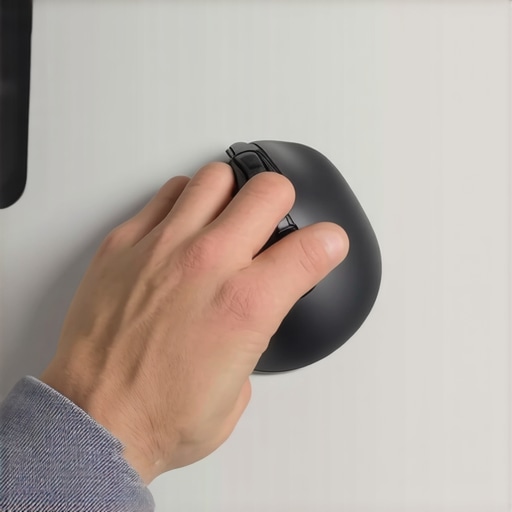
A Digital Nanny for Your Spine
Even with the best gear, your brain will eventually forget to stay upright. That’s why I rely on ‘micro-break’ software like Workrave or StretchClock. These tools aren’t just timers; they are behavioral resets. Every twenty minutes, a small prompt appears on my screen, reminding me to perform mobility boosts for posture expert tips for daily adjustments. This habit is backed by the Cornell University Ergonomics Web, which suggests that micro-breaks are essential for reducing the risk of musculoskeletal disorders because they allow the tissues to re-oxygenate. If you find yourself ignoring these prompts, you might be making the biggest mistake people make when using a standing desk, which is staying static for hours on end regardless of your position.
How can I maintain my posture progress over the years?
Consistency is the only way to avoid backsliding into old, painful habits. I recommend a ‘maintenance stack’ that includes regular check-ins with a professional and a simple daily movement routine. For me, chiropractic adjustments unlock a pain-free lifestyle today by ensuring that my spine is actually capable of the movements I’m asking it to do. You should also audit your car and home setup; learn how to use a lumbar roll correctly in an office chair or driver’s seat to protect your lower back when you aren’t at your main desk.
The Future of Your Ergonomic Workspace
As we look toward the future, I predict we will see a massive shift toward AI-driven posture monitoring. We are already seeing the early stages with wearable sensors that vibrate when you slouch, but soon, our webcams will likely integrate with our operating systems to provide real-time skeletal mapping. This will help you identify improving posture through mobility practical chiropractor strategies that are specific to your unique body type and height. This isn’t just about gadgets; it’s about having a biological feedback loop that prevents damage before it occurs. My advanced tip for you this week: Download a simple micro-break app today and actually follow the prompts for 48 hours. You’ll be shocked at how much tension you’ve been ignoring simply because your brain tuned it out.
The Hardest Lesson I Learned About Desk Pain
When I first fixed my mouse position, I expected the electric zing in my hand to vanish within an hour. It didn’t. I quickly learned that your nerves have a functional memory, and it takes time for inflammation to recede even after the physical pressure is removed. Don’t get discouraged if you aren’t 100% better by your afternoon coffee break; consistency over three to four days is where the real magic happens. I also discovered that the link between mobility and posture is the absolute foundation of ergonomics—if your joints are locked up, your muscles will remain in a state of high alert regardless of where your mouse sits. Most importantly, I realized that ignoring a ‘small’ tingle is like ignoring a smoke detector with a low battery; eventually, the fire starts, and it’s much harder to put out than simply changing the battery.
Gear That Actually Earned a Spot on My Desk
I’ve tested dozens of gadgets, but I only trust a few tools to keep my spine in check. I highly recommend using a vertical mouse with at least a 50-degree slope to prevent forearm crossover, paired with a low-profile mechanical keyboard. For those looking to overhaul their entire environment, the ultimate guide to improving mobility and posture in 2025 offers a deep dive into the hardware that truly makes a difference. I also personally swear by why chiropractic care is your secret weapon for better posture because no piece of plastic can replace the benefit of a professional realigning a joint that has been stuck for months. Finally, a simple external monitor riser is non-negotiable to keep your gaze at eye level and your neck out of a forward slump.
Give Your Body a Chance to Heal
Your body is a masterpiece of biological engineering, but even the most resilient machine requires a proper tune-up when the gears start to grind. By taking control of your workspace today, you are actively preventing years of chronic frustration and the looming threat of invasive surgery. Remember that chiropractic adjustments unlock a pain-free lifestyle today by clearing the path for your nervous system to communicate with your limbs without interference. You deserve to finish your workday feeling energized rather than counting down the minutes until you can reach for an ice pack. Take that small step of moving your mouse closer to your body right now—your future self will thank you for it. Have you ever found a specific desk adjustment or a piece of gear that fixed your hand tingling or wrist pain? Let me know in the comments below!